Open navigation

Renewing OCLC Referral Center Items

Renewing Interlibrary Loan Items

  1. Enter the Request ID and click the search icon.

    Request ID entry field and search icon in the Referral Center

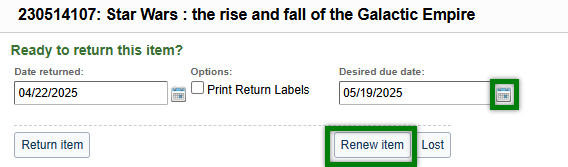
  2. Click the calendar icon to pick the desired due date, then click Renew item.

    Calendar selection tool and the Renew Item button

  3. A confirmation message will be displayed at the top of the screen.

    Confirmation message stating the item has been successfully renewed

Was this article helpful?

That’s Great!

Thank you for your feedback

Sorry! We couldn't be helpful

Thank you for your feedback

Let us know how can we improve this article!

Select at least one of the reasons
CAPTCHA verification is required.

Feedback sent

We appreciate your effort and will try to fix the article